 Overtalk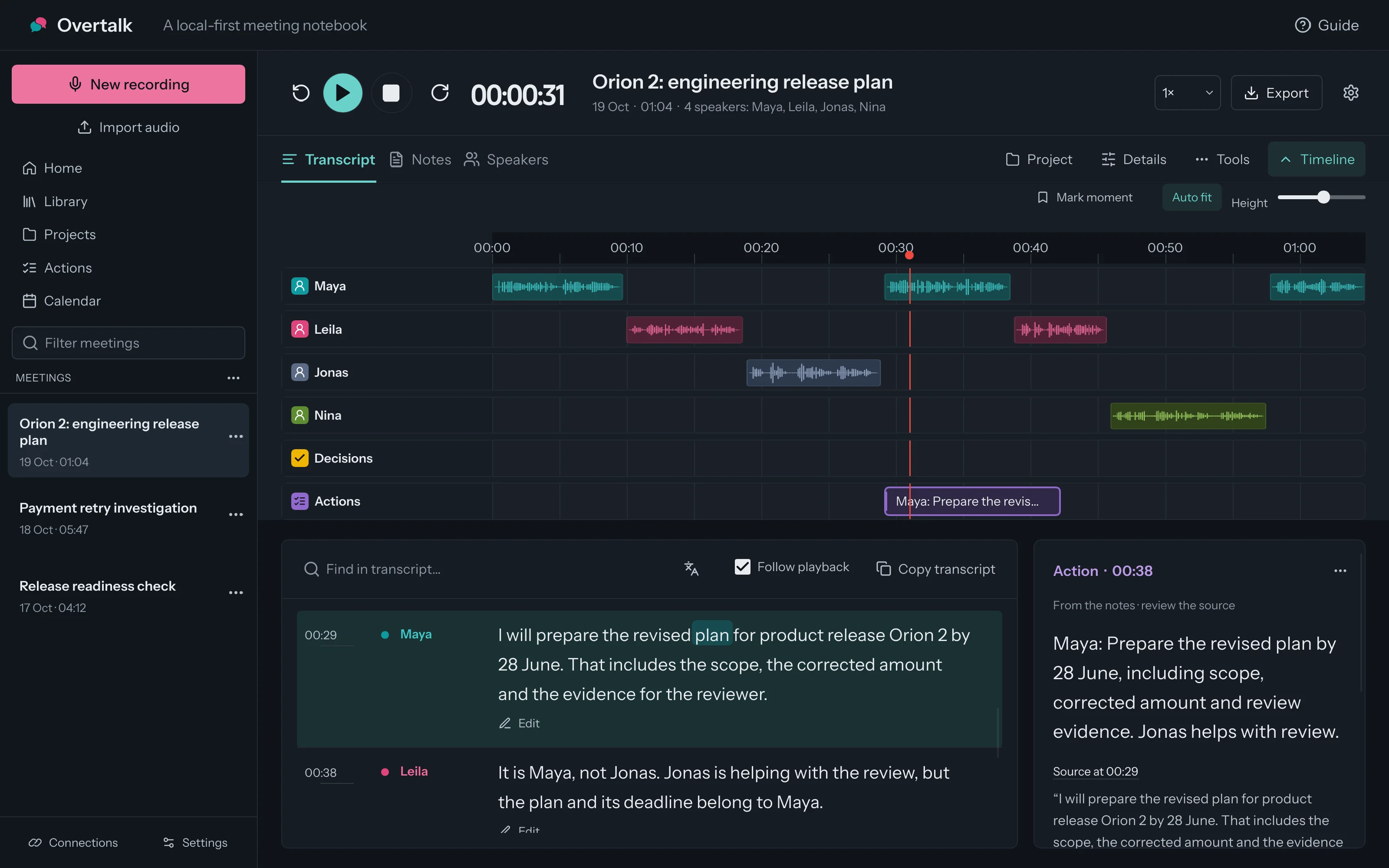


Prepare the revised plan for Orion 2
Not sent- Owner
- Maya
- Due
- 28 June
- Destination
- Linear · Orion team
Include scope, cost and review evidence. The release stays conditional on passing the review.
Overtalk is an open-source meeting notebook for the desktop. It records meetings on your computer with no bot in the call, transcribes them there, and links every decision, action and open question to the moment it was said.
Free and open source. A Linux developer preview you build from source; no installer yet. Build guide

ConditionThe release stays conditional on passing the review.
Exhibits from one fictional meeting. Pick a tab, then play the source.

Try it with the sample meeting.
Music: The Vibe · Punch Deck, CC BY 4.0. How the films were made
A 65-second clean edit of a fictional release review. Press play, or choose any word to hear it. The notes are what Overtalk actually saved.
Maya: The previous target for product release Orion 2 was 24 June. That depended on getting the missing information early, and we did not get it.
Leila: I disagree. If we call this finished before the checks, people will rely on a promise we cannot support. A smaller scope would be more honest.
Jonas: Could we at least drop the final review? Otherwise I am worried the date will move again, and I will have to explain that to the same people.
Maya: I will prepare the revised plan for product release Orion 2 by 28 June. That includes the scope, the corrected amount and the evidence for the reviewer.
Leila: It is Maya, not Jonas. Jonas is helping with the review, but the plan and its deadline belong to Maya.
Nina: One question is still open: whether we need additional support for product release Orion 2. We do not have enough information to decide that today.
Maya: 28 June. I am repeating it because the earlier target, 24 June, is no longer the commitment.
Decision
Product release for Orion Two proceeds with reduced scope and a cost ceiling of 460 euros, conditional on passing the review.
لا اقتراح تجاوز المراجعة مرفوض فهي ما زالت شرطا لاستكمال إطلاق المنتج وراينتو.
“No — the proposal to skip the review is rejected. It is still a condition for completing the Orion Two release.” Said in Arabic at 04:43 of the full meeting, so it is not in this English sample.
Action · Maya · due 28 June
Prepare the revised plan for product release Orion Two including scope, cost, and review evidence.
Still open
Does product release Orion Two require additional support?
These notes were saved for the original 6½-minute English–Arabic version of this meeting, made on one computer with local models. What you hear is a clean English edit, so “Orion Two” and the euro amount come from parts you don't hear.
Fictional meeting, four synthetic voices. How the sample was made
Press Play, or choose a word.Take the record with you. Export notes and transcripts as PDF, DOCX, Markdown, text or JSON.


Now hear the clean sample.
Music: The Vibe · Punch Deck, CC BY 4.0. How the films were made
Nothing leaves your computer unless you choose a route. Each route has a different boundary, and you can see which one a meeting took.

Free · the default
The recording, transcript and notes stay on this device. Local speech and language models do the work, with no cloud account.
What stays on your device
Free · your own account
Your device checks the EU worker by remote attestation, then encrypts the request. Privatemode states that prompts and responses are not kept or used for training.
The official local proxy verifies the processing environment before encrypting on your device; prompts open only inside the verified environment. Operational and billing metadata is retained. Attestation documentation · Provider DPA

Optional subscription · planned · opt-in
200+ hours of meeting summaries a month with advanced private AI models. Your computer encrypts each one for Privatemode with a key issued for your subscription. Overtalk never sees the text.
The planned data flowRecording a meeting never requires a calendar or cloud connection. Privacy, in plain language
About an hour before a meeting, Overtalk gives you a brief: what was decided last time, what is still open and who is coming, each line linked to the moment it was said. It is built from the project's earlier meetings, for people who run the same work across many of them: client engagements, releases, hiring loops.
All of it runs on your computer and is part of the free, open-source app. If you add the optional private AI summaries, your computer encrypts each one for Privatemode's verified servers with your own key; Overtalk never receives the text.
Free · included
MIT open source, in every install
Projects, filing, briefs and remembered voices are in the open-source code. The only paid option is the private AI summaries subscription, planned at €10 a month or €96 a year, because each summary runs on Privatemode's servers.

Overtalk files the meeting and prepares you for it. Every automatic choice shows its reason, and your own choice always wins.
Before it starts
Calendar meetings are filed in their project from the recurring series, invitees, their organisation, title phrases and the calendar account. A close call becomes a suggestion.

About an hour before
A brief: what was decided and what is still open, open actions, who is coming and the status of tickets from earlier meetings. Talking points come from your notes model and must cite those lines. A reminder follows.

When a call with no invite ends
Overtalk reads the transcript for each project's name, vocabulary and people. A clear match is filed before notes are written; a close call waits for you to accept or dismiss it.
Desktop app screens with fictional Orion 2 data.
A project keeps its meetings together, so a question can be answered across all of them.

Confirm a speaker once. Their voice profile stays on your computer, scoped to this project.

Facts proposed from a meeting wait for your review, each with the passage it came from.

Follow-ups go to your team's tools only after you check the destination and the text.
Include scope, cost and review evidence. The release stays conditional on passing the review.
 LinearIssues
 JiraTickets
 ConfluencePages
 GoogleCalendar, Docs, Drive
Desktop app screens with the fictional Orion 2 project; two of its meetings exist only as list entries.
Overtalk is free and open source, with everything included. Private AI summaries are an optional subscription.
Overtalk
€0
MIT open source with everything included. There is no paid edition.
200+ hours a month of meeting summaries with advanced private AI models, for longer or more complex meetings. Opt-in and encrypted on your computer; Overtalk never receives the text. It pays for running the models, so nothing in the app depends on it.
For teams: invoices, a data processing agreement and support, quoted on request. What teams get
No. It records the microphone and the call audio you select on your own computer. Let people know when you record.
Yes, and ask whether they agree. No bot joins the call, so nobody sees a recording sign; telling people is your job. Before it records, Overtalk offers one sentence to paste into the chat or read aloud, worded for where the audio and transcript go, and saves how people were told with the meeting and its exports. In Germany, recording a conversation that is not public without permission can be a criminal offence. What to say, and what the law asks
Today, Linux: a developer preview you build from source. macOS and Windows builds and their audio capture still need validation, and there is no installer yet; packages for all three are being prepared. Overtalk on Linux
No. Local models need no cloud account. Download models that fit your hardware. An external provider is optional and may charge for usage.
A clean 65-second English edit of a fictional release review, voiced by four synthetic voices (Gemini 3.8 Flash TTS). The notes beside it are Overtalk's unedited saved output for the original 6½-minute English–Arabic version, made with local models (Qwen3-ASR 1.7B for speech, Qwen3.5 4B for notes). The films are animated walkthroughs of the interface, not screen recordings. Audio and demo sources
That depends on the local speech engine you choose. The built-in engine, Parakeet TDT 0.6B v3, needs no Python and covers 25 European languages, including English, German, French, Spanish, Italian, Polish, Portuguese, Russian and Ukrainian. The optional local speech worker runs Qwen3-ASR 1.7B, which covers 30 languages: Arabic, Cantonese, Chinese, Czech, Danish, Dutch, English, Filipino, Finnish, French, German, Greek, Hindi, Hungarian, Indonesian, Italian, Japanese, Korean, Macedonian, Malay, Persian, Polish, Portuguese, Romanian, Russian, Spanish, Swedish, Thai, Turkish and Vietnamese. Accuracy varies with the language and the recording. Parakeet's languages · Qwen3-ASR's languages
For local notes without a bot on Linux, yes. Those services list no Linux app and process meetings in their cloud; Overtalk records, transcribes and writes notes on your computer. They offer packaged apps, mobile capture and team sharing that Overtalk does not yet. The dated comparison
Yes. All of Overtalk is MIT-licensed open source, including projects, automatic filing, briefs and remembered voices. The only paid option is a planned subscription for private AI summaries, because each summary runs on Privatemode's servers; your own Privatemode account works without it.
Jude Mingay, an independent AI engineer in Freiburg, Germany. judemingay.com. Overtalk began in September 2026 as a fork of the open-source community edition of Meetily (MIT), and has since been rebuilt with a native desktop interface, a sandboxed speech worker and notes that cite their sources. What changed since the fork
That depends on your deployment, permissions, retention practices and agreements. Local processing does not make a deployment compliant by itself, and we do not claim HIPAA certification. Safeguards and requirements